The Mindset Shift That Made React Finally Click

Life Before React
I used to build a lot of cool projects with vanilla JavaScript and what I thought was really clever DOM manipulation. I was proud of it. I knew how to grab elements, trigger smooth slide-in animations, toggle classes, and chain event listeners together like a finely tuned machine.
When I showed one of these projects to my mentor at the time (My Dad), he acknowledged the work, gave me props, but dropped a subtle hint:
"This is great, but once you start using modern libraries, you won't need to manually handle the DOM like this."
Honestly? I didn't see the why. My code worked. It felt fast, and I was in complete control of every pixel.
Until I started building a significantly larger application.
Suddenly, a lot had to happen at the same time. A single user action needed to trigger an API fetch, update three different parts of the screen, disable buttons to prevent double-clicks, and show a loading spinner. If the user clicked something else while that request was pending, the state drifted, UI elements fell out of sync, and I found myself fighting subtle bugs and race conditions.
The code became fragile. Adding a new feature meant remembering six different DOM nodes I had to manually update without breaking the other five.
At this point, I must have realized: my model for building user interfaces was broken.
The Vanilla JS Trap: Imperative Step-by-Step
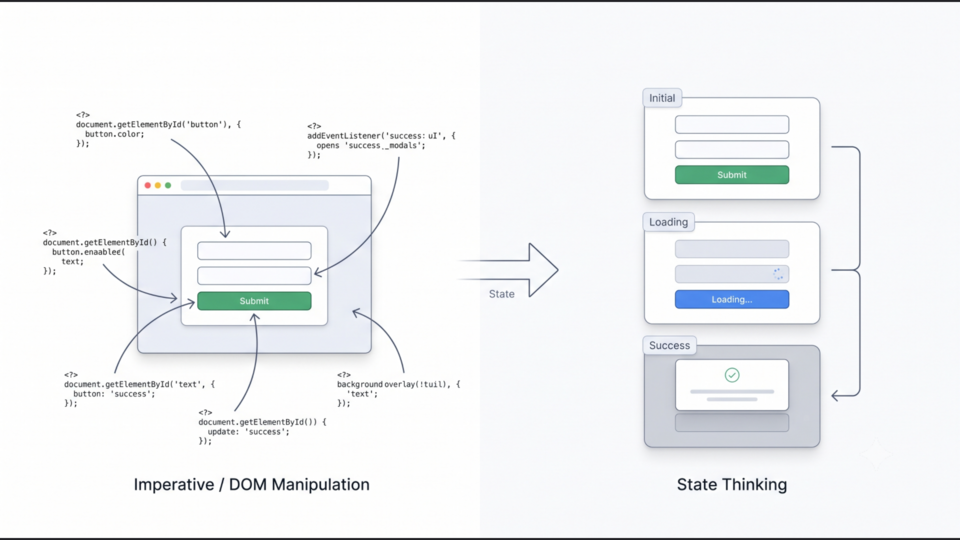
When you learn web development, you start by thinking imperatively. You treat the DOM like a list of manual instructions you give to a worker.
A regular interaction, for example: submitting a form, looks like a recipe:
javascript
Notice the core question driving this entire process: "How do I update the UI right now?"
As your application grows, this approach explodes in complexity. You end up with more events, more listeners, more conditional checks, and more dependencies. You stop building new features because 80% of your dev time is spent manually coordinating updates so your data and your UI don't slowly drift apart.
Changing the Question
React’s core value isn't JSX. It isn't Hooks. It isn't virtual DOM performance.
The real shift is that React forces you to stop asking how to change the UI, and start asking a completely different question:
"What state is my application currently in?"
Instead of viewing an application as a sequence of DOM edits, React encourages you to think of the interface as a series of snapshots.
To make this concrete: State is simply the information that determines what your UI should look like at this exact moment.
Let's re-examine that same form, but modeled as state transitions instead of a sequence of DOM tweaks:
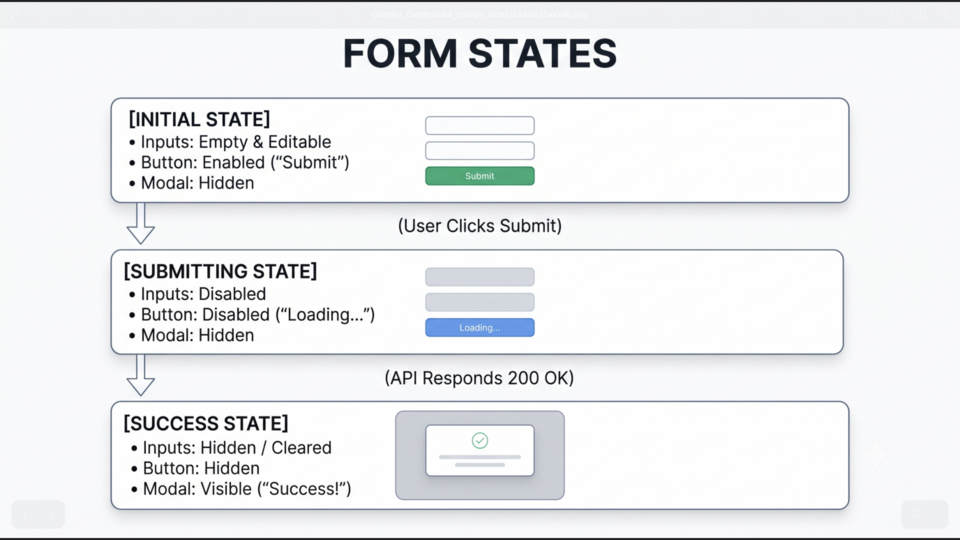 React State Model
Look at how different this mental model is.
You aren't writing code that says "find the button and change its color to blue, then find the modal and make it visible." You are defining three static descriptions of your interface: Initial, Submitting, and Success.
When the underlying data shifts from Submitting to Success, you don't touch the DOM. You just change the state, and the UI naturally falls out of it.
Why This Model Scales
When you stop manually modifying elements, an entire category of bugs disappears.
In a vanilla setup, if three different network requests finish at slightly different times, you have to carefully manage which one gets to update the DOM last so you don't overwrite fresh data with stale data.
In a state-driven model, React coordinates rendering for you. React already knows which components rely on a specific piece of state. When that state updates, React handles synchronization behind the scenes.
Instead of forcing every interaction yourself, you simply describe the different states of your application, and React reacts to those state changes. That's literally where the name comes from.
A Word of Caution: Don't Introduce Complexity Just Because You Can
Does this mean vanilla JavaScript is dead and you should throw React at every single project? Absolutely not.
One trap beginners fall into after making this mental shift is over-engineering everything.
- A marketing landing page with two static buttons and a CSS hover effect? Use plain HTML, CSS, and vanilla JS.
- A simple blog site with minimal interactivity? Static HTML or light JS is cleaner and faster.
React exists to solve UI complexity. More specifically when you have shared state across multiple components, dynamic real-time data, and complex user interactions. If your application doesn't have that problem, you probably don't need React's solution.
Conclusion
When I first struggled with React, I thought my issue was syntax and I needed to memorize more Hooks, practice more context patterns, or master component lifecycles.
It turned out the syntax was the easy part. The real challenge was unlearning years of imperative thinking.
Before React, programming a user interface meant changing it step by step.
React taught me something fundamentally different: You don't tell the interface how to transform. You describe what it looks like right now, update the underlying state, and let the framework handle the rest.
Discussion (0)
No comments yet. Start the discussion!